
WHAT IS FOXRATE?
As an ‘Application Service Provider‘ FOXRATE offers a free browser based application. FOXRATE enables companies trading over the internet to collect and generate customer reviews from various sales channels (Online Shops, eBay, Amazon and more). These reviews offer a complete overview of the company’s sales activity from across the web, visible from the ‘FOXRATE Traders Profile’ and through a number of widgets available for your online presences.
Further advantages include a number of automated tasks, including an automated arbitration process for negative ratings and respective email templates with placeholders for customization.
Once the system has been successfully configured, the trader can concentrate fully on their sales activities, without having to intensively work on customer communication as well.
And despite the reduction in communication effort, with every new generated and imported review, the trust of customers in the trader’s business increases and sales conversion rates increase.
WHY INTEGRATE FOXRATE IN YOUR OWN SALES CHANNEL?
FOXRATE is free! Once integrated in a sales channel, FOXRATE collects, organizes and presents customer opinions almost completely automatically. This includes the setup of reminder mails, reward possibilities for very good or improved reviews, and even an automated arbitration process in the case of problems or misunderstandings, between the customer and trader, which have lead to negative reviews.
FOXRATE doesn’t just generate and collect customer opinions of the trader, but, if you wish, also your customers’ opinions of the products they buy. Not just through the traders only shop channels, but, and this is unique, directly through eBay sales, in that the eBay sales data is automatically imported into FOXRATE which dispatches an email requesting a product review.
FOXRATE is well rounded by the further option of a so ‘site Feedback widget’ through which customers can suggest improvements and notify the trader of errors or praise directly in the traders website. This widget is installable on all websites, regardless of the sales channel.
MODULE FOR YOUR SHOPPING CART SOFTWARE - INTRODUCTION
The module is written in PHP and assumes that your system runs with PHP and MYSQL. In order for the module to function correctly, it requires the PHP cURL extension. This must be installed and activated. You can find further information about cUrl here: http://en.wikipedia.org/wiki/CURL
After a successful installation and connection with the FOXRATE system the necessary data will be read by FOXRATE at regular intervals, and, according to the settings selected in the FOXRATE administration panel, rating request emails will be sent.
GAMBIO FEEDBACK INTEGRATION MODULE INSTALATION STEP BY STEP
There are just a few simple steps to install Foxrate FI module into your shop system:
- Extract archive
- Copy to your website
- Install it in your shop's module center
- Authorize with Foxrate
- Activate advanced features
Extract archive
After you downloaded this module, pleace extract it your local drive
Copy to your website
After extracting module, you must copy a whole content of extracted folder to your shop folder. Your shop web folder usually is a place, there your shop's index.php file resides.
Install it in your shop's module center
Now please login to your Gambio admin and press on Module center from your left links, you can find it in Modules section.
Now you can see all available modules. Find a Foxrate Feedback integration and press in Install button on the right.
After installing it, you can press Start and Configuration ( o simply visiting http://YOUR-WEBSITE-URL/admin/foxrate_fi.php ). Here you will see Foxrate authorisation form.
Enable it
Here you must enter your FOXRATE API login (Foxrate API username and Foxrate API Password) details which can be found inthe FOXRATE administration panel under the menu item Settings >> APIs.
Picture 2.
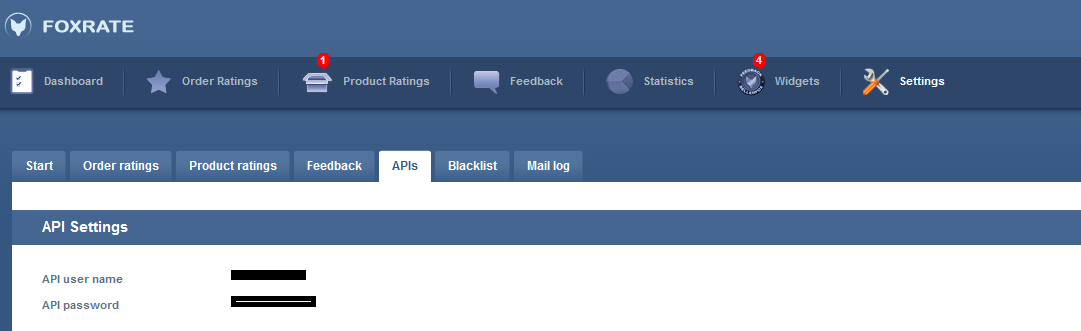
After clicking “Save” a request will be made to FOXRATE to check your API details, and your shop will be connected with FOXRATE.
In the FOXRATE administration panel under Settings>>APIs the connection to your shop will be shown as a new channel. The column ‘channel name‘ should show the domain name of your shop, and a green tick should be present indicating it is successfully connected.
Activate advanced features.
Enable rich snippets.
Note: this is a place where a user should manually install the rich snippet
File: templates/EyeCandy/module/product_info/standard.html (EyeCandy should be replaced with your template name)
Line: 40
Before: <h1>
After: <h1 itemprop="name">
Action: Replace
To enable rich snippets, in your Gambio Foxrate FI settings panel please open Feedback settings tab. Here you will find an option: Rich snippet active - set it to Yes and press save. If there are no errors, you will see Settings successful.
Rich snippets notice
Icon
Please note, that Rich snippet feature will be deactivated, if there are any errors. This feature won't be active till all errors won't be removed.
Enable Rating stars in product list
To enable product listing stars (if you wan't to see Foxrate rating stars in index page), you must add following code to this template:
Open template templates/EyeCandy/objects/product_boxes_list.html (EyeCandy should be replaced with your template name).
Around line 20 add the code:
<div style="float: right"> {foxrate_review_stars product_id=$module_data.PRODUCTS_ID}</div>
Foxrate stars are generated from this code: {foxrate_review_stars product_id=$module_data.PRODUCTS_ID} , so you can encapsulate or place this code where is best for you.
Thank you for using FOXRATE with your Shop!